Lock Cursor Tools8.1
Publisher Description
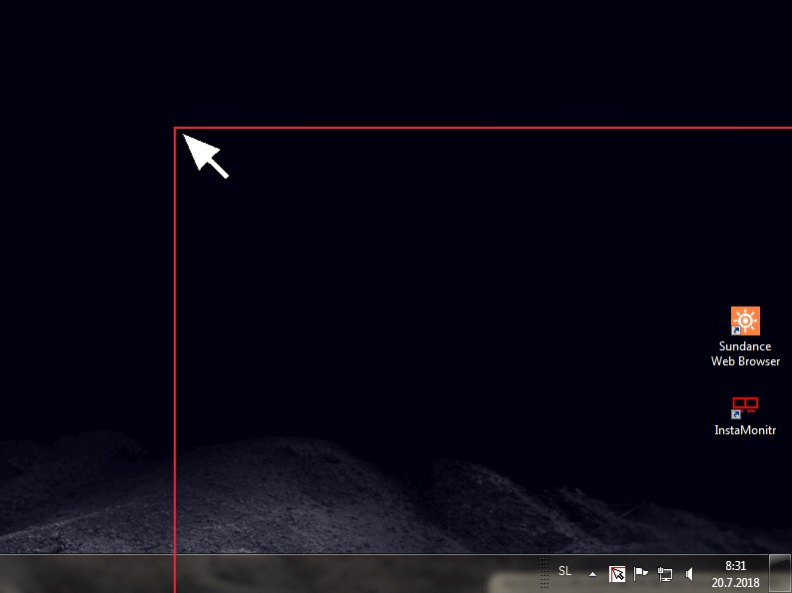
Lock Cursor Tools simply locks the mouse cursor. You may choose a predetermined area, the primary or secondary monitor screen or part of the window of a particular application.
Lock Cursor Tools makes your computer work more productively by improving quality and performance. You can use it for professional work or for fun activities. By locking the cursor to a particular area on the screen, you can focus better on the actual work on the computer, without having to check where the mouse pointer is. You can focus solely on a particular application. You can turn on or turn off the locking of the cursor by using a keyboard shortcut or by clicking the application icon in the taskbar.
When choosing a predetermined area, simply mark the area where you want the cursor to move by using the mouse. The area may be expanded across several monitors.
You may choose the window of a particular application by clicking the available windows in the selection interface.
In contrast with similar applications, Lock Cursor Tools is simple to use and very efficient. It runs smoothly in the background and is not heavy on system resources..
System requirements: Windows XP, Vista, 7, 8, 10, 11
About Lock Cursor Tools
This program is available in English. It was last updated on 29 September, 2026. Lock Cursor Tools is compatible with the following operating systems: Windows.
The company that develops Lock Cursor Tools is Digola. The latest version released by its developer is 8.1. This version was rated by 1 users of our site and has an average rating of 4.0.
The download we have available for Lock Cursor Tools has a file size of 1.0 MB. Just click the green Download button above to start the downloading process. The program is listed on our website since 2023-09-29 and was downloaded 241 times. We have already checked if the download link is safe, however for your own protection we recommend that you scan the downloaded software with your antivirus. Your antivirus may detect the Lock Cursor Tools as malware if the download link is broken.
How to install Lock Cursor Tools on your Windows device:
- Click on the Download button on our website. This will start the download from the website of the developer.
- Once the Lock Cursor Tools is downloaded click on it to start the setup process (assuming you are on a desktop computer).
- When the installation is finished you should be able to see and run the program.
Program Details
System requirements
Download information
Pricing
Version History
version 8.1
posted on 2023-09-29
- fixed some bugs
version 8.0
posted on 2023-08-31
- option to lock at the current cursor position
- blur option for the unselected area
- fixed some bugs
version 7.0
posted on 2023-04-23
New core
Added option to mark a locked area.
Fixed some bugs
version 6.2
posted on 2022-09-20
fixed some bugs
option to lock on startup
version 6.1
posted on 2022-06-13
fixed monitor width detection bug
version 4.2
posted on 2021-05-18
new core
new interface
fixed some bugs
version 3.1
posted on 2021-04-04
New core
version 3.0
posted on 2020-09-02
Lock Cursor Tools is Now freeware
